Looking for an Alarmy alternative? Fair. Alarmy is the best-known mission alarm on the App Store, with far more ratings than any other app in this guide. But popular isn't the same as right for you. Maybe you want something stricter. Maybe you want something simpler. Maybe you just want an alarm that gets you moving instead of solving sums at 6 AM.
This guide compares six iPhone apps like Alarmy, using only what each app says on its own App Store listing or help pages. It covers how each one turns off, whether you can beat it from bed, and which ones cost money to actually use.
The best Alarmy alternative depends on why you're leaving. For a stricter, exercise-based alarm, try RiseReps (camera-counted push-ups, squats, or jumping jacks). For lots of missions in a similar style, try SuperAlarm or Wayk. For a free alarm app like Alarmy, look at Mathe Alarm Clock or Barcode Alarm Clock. If you want a physical object you have to walk to, there's Unbed.
What Alarmy does well (and why people look elsewhere)
Credit where it's due. Alarmy, from Delight Room, popularized the mission alarm: an alarm that won't stop until you complete a task. According to Alarmy's own mission guide, it offers math problems, memory tiles, typing, shake, squats, walking, photo, QR/barcode, and a household item hunt. You can chain missions together, and a Fall-Back-Asleep Prevention setting re-checks you a few minutes after you dismiss the alarm and restarts the mission if you don't respond.
Its App Store listing also bundles a snore and sleep tracker, sleep sounds, and bedtime reminders. It's free to download, with an Alarmy Premium in-app purchase.
So why search for an alternative to Alarmy? From the way people phrase it ("apps like alarmy but free," "alarmy alternative no ads," "is alarmy worth it"), the reasons usually fall into four buckets:
- You beat it from bed. Math, typing, memory tiles, and shake can all be done lying down. If that's the mission you picked, your half-asleep self has already figured that out.
- You want fewer features. Sleep tracking, snore recording, and sleep sounds are great if you use them. If you only want a wake-up alarm, they're extra screens.
- You want to pay less, or nothing. Some features sit behind a subscription, and plenty of people want to know what a free Alarmy alternative can do.
- You want the wake-up to count for something. Solving 3 × 17 gets you up. A set of squats gets you up and moving.
Knowing which bucket you're in is the whole game. The best Alarmy alternative for a chronic snoozer is different from the best one for someone who just wants a cheaper app.
How to judge any Alarmy alternative
Feature lists are long and mostly noise. Run every mission alarm app through these five questions instead:
- Can I turn it off from bed? This is the big one. Groggy-you is surprisingly good at math and terrible at walking to the bathroom. If the task works lying down, it will eventually lose.
- Can I escape by closing the app? The strong apps re-fire, re-check, or block the exit.
- Will it keep me up? Getting out of bed for 20 seconds and climbing back in isn't a win.
- What does it cost to use the features I need? "Free" on the listing can mean free to download, not free to use.
- Will I still use it in a month? An alarm you dread gets deleted. Pick a challenge you can do on your worst morning.
We ranked seven kinds of hard-to-dismiss alarms against question one in Alarm Clock That Makes You Get Out of Bed: 7 Types Ranked. The short version: tasks tied to a place (scanning a code in the bathroom) or to your body (doing reps) beat tasks that only need your brain.
There's a bonus for movement, too. In a 2021 lab study in Physiology & Behavior, Kovac and colleagues woke people from sleep and had them do a 30-second high-intensity bike sprint, a 30-second easy spin, or nothing. People felt least sleepy after the sprint. Their test scores didn't improve, so this is about feeling awake, not getting smarter. But feeling awake is exactly what stops you from crawling back under the covers.
6 apps like Alarmy for iPhone, compared
Every detail below comes from each app's App Store listing, checked in October 2026. Apps update often, so check the listing before you download.
| App | How you turn it off | Beat it from bed? | Cost to use |
|---|---|---|---|
| RiseReps | Camera-counted push-ups, squats, or jumping jacks | No | Free to download, one annual subscription |
| Wayk | Missions: push-ups, photo of the sky, make your bed, find an object and more | Depends on the mission | Subscription required to set alarms |
| SuperAlarm | Missions: math, memory, barcode, object scan, Face ID, walking | Depends on the mission | Free to download, subscriptions available |
| Barcode Alarm Clock | Scan a barcode you chose (like your toothpaste) | No | Free to download |
| Mathe Alarm Clock | Solve multiple-choice math problems | Yes | Listing says all features are free |
| Unbed | Tap your phone on a physical Unbed block | No (if the block is out of reach) | Needs the Unbed block, sold separately |
1. RiseReps: the Alarmy alternative for iPhone that makes you move
RiseReps is a workout alarm clock. When it goes off, your camera counts a set of push-ups, squats, or jumping jacks, and the alarm only goes quiet once your reps are done. There's no snooze button and no tap-to-dismiss.
Alarmy has a squat mission too, so here's the honest difference. In Alarmy, exercise is one mission out of nine. In RiseReps, it's the whole product, and the strictness settings are built around it:
- Persistent mode re-fires the alarm every 60 seconds if you close the app.
- Full Lockdown (optional) blocks your other apps until the workout is done.
- Weekly progression can raise your rep count each week, so the habit grows with you.
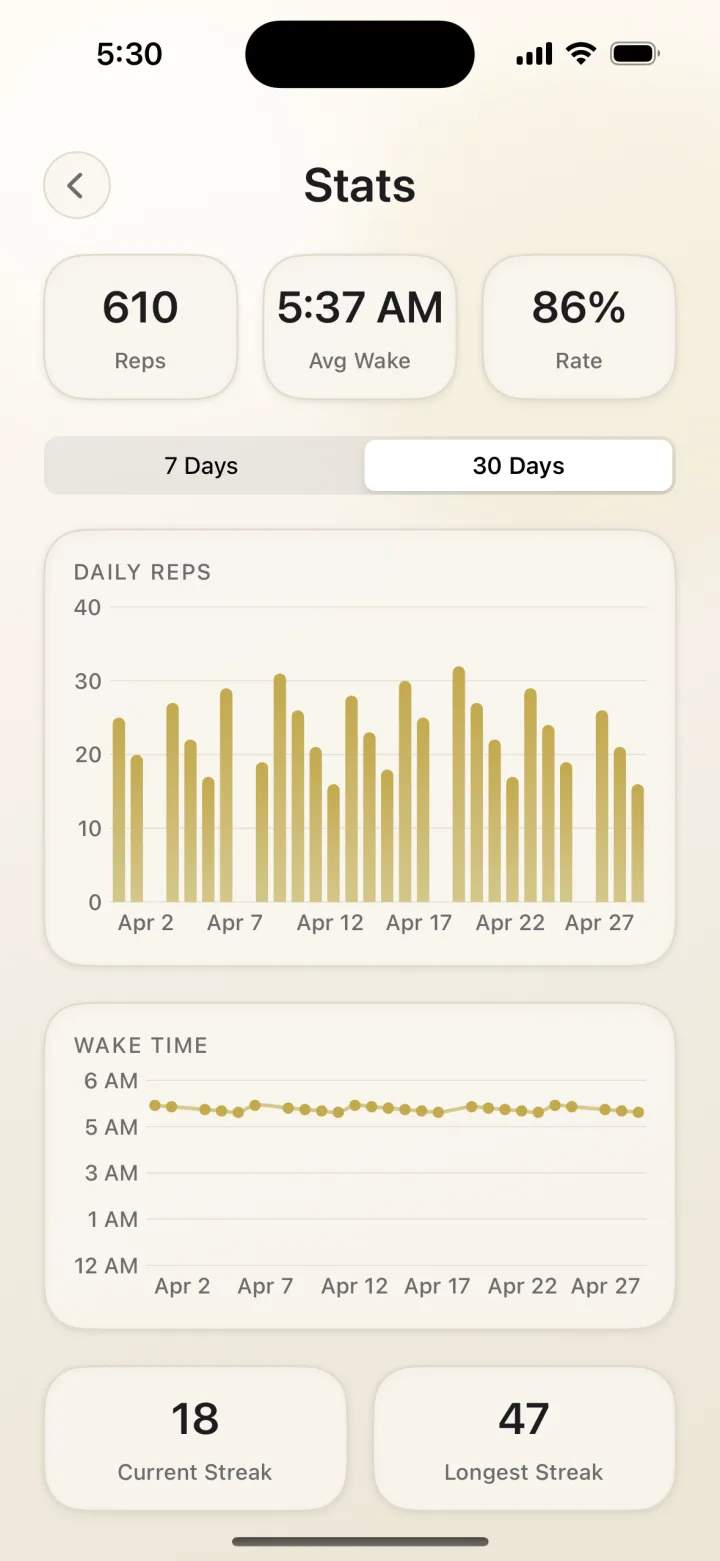
- Streaks and stats track reps, wake time, completion rate, and your longest streak.
- An accountability partner sees your streak, and either of you can send one nudge a day.
Rep counting uses on-device pose detection. Frames are analyzed in real time and discarded, so nothing is recorded or uploaded. It's free to download on the App Store, with a single annual subscription.
Watch out for: the camera has to see you. Prop the phone 5 to 6 feet away with even light in front of you, not a bright window behind you. Our push-up alarm guide covers setup and how many reps to start with.
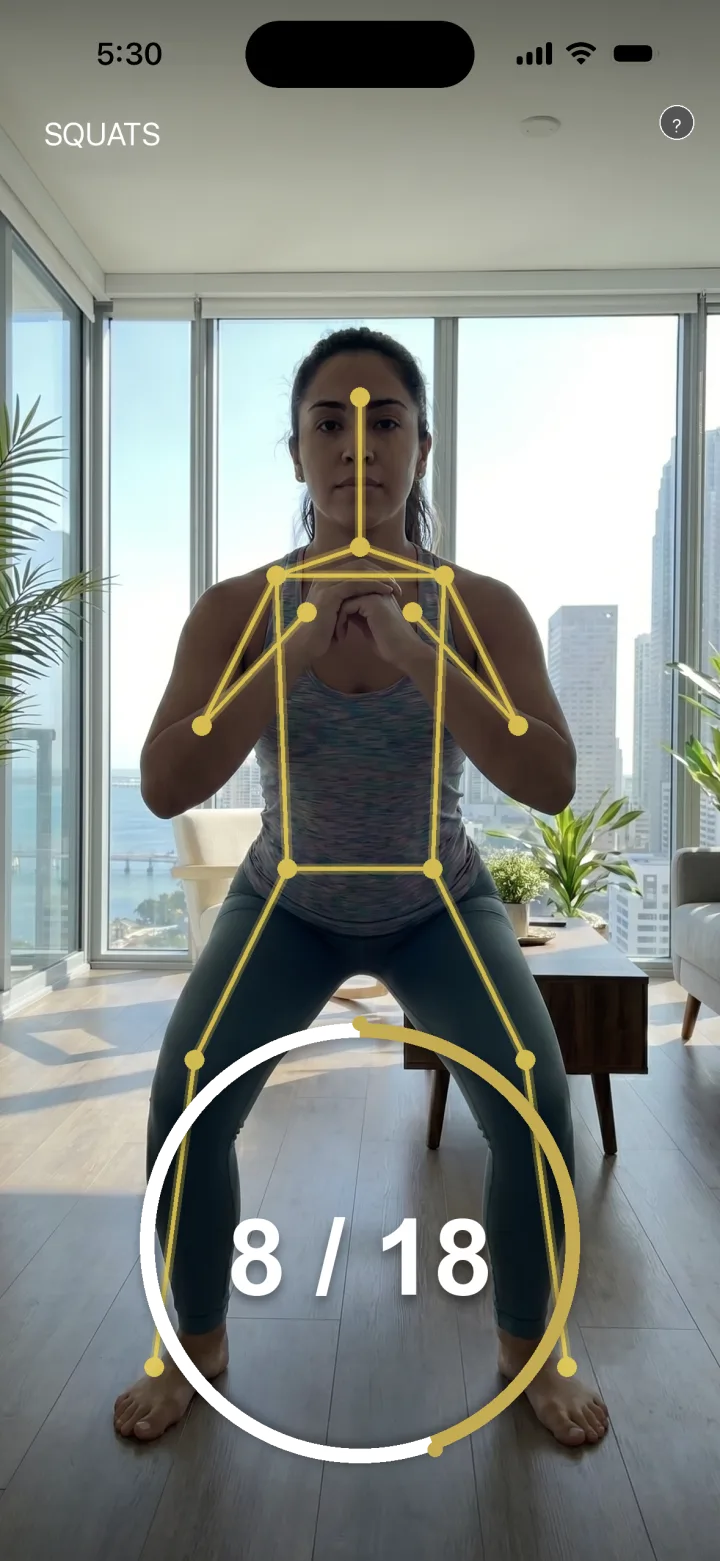
RiseReps only stops when your camera counts your reps. No snooze, no tap-to-dismiss, and Persistent mode re-fires if you bail. Nothing recorded or uploaded.
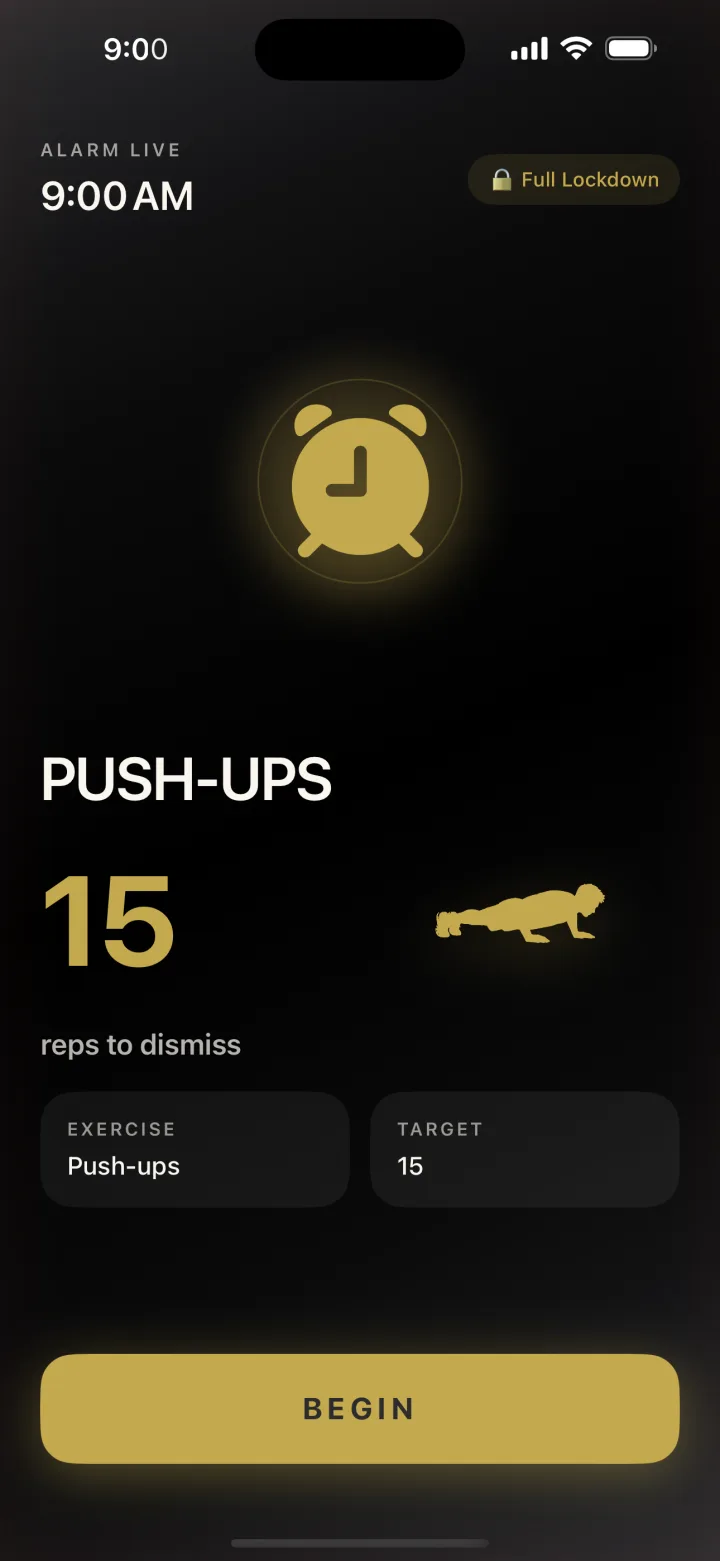
2. Wayk: the closest match to Alarmy's mission style
Wayk, from Dialed Labs, is a newer mission alarm. Its App Store listing says you choose a mission before bed and "the alarm only stops when the mission is done." Missions include doing push-ups, taking a photo of the sky, making your bed, finding a random object, reading a Bible verse, and reading an affirmation aloud. It also tracks streaks and morning insights and allows unlimited alarms.
Watch out for: the listing is upfront that an active Wayk Pro subscription is required to set alarms and use missions. It's a paid app, not a free Alarmy alternative. The listing also doesn't explain how the push-up mission checks your reps.
3. SuperAlarm: the most Alarmy-like feature set
If you like Alarmy and just want a different flavor, SuperAlarm is the nearest neighbor. Its listing names six missions: math problems, memory games, barcode scanning, object scanning, Face ID, and walking. There's a "Wake up check" feature for heavy sleepers and app deletion prevention while the alarm is ringing.
Watch out for: its feature list includes "infinite snooze until you wake up," so read the settings carefully if snoozing is your problem. Stick to barcode, object scan, or walking missions, since math and memory can be done from bed. It's free to download with auto-renewing subscriptions.
4. Barcode Alarm Clock: one job, done well
Barcode Alarm Clock does what the name says. To stop the alarm, you scan a barcode you chose in advance, like your toothpaste. Put that object in the bathroom and you have to walk there. Its listing also describes lockable alarms, procedurally generated ringtones designed so you don't adapt to them, and a short "don't wake my spouse" snooze.
Watch out for: if you're traveling or the barcode wears off, you need a plan B. And once you're in the bathroom, nothing stops you walking back to bed.
5. Mathe Alarm Clock: the free math alarm
Mathe Alarm Clock comes from the same developer as Barcode Alarm Clock. You solve multiple-choice math questions to shut it off, and the listing says "all features for free," with lockable alarms and an optional 10-second snooze for shared rooms.
Watch out for: math fails the "can I beat it from bed?" test. It wakes your brain, not your body. Great if you just need to stop sleeping through alarms. Weak if you're turning alarms off on autopilot. We cover that difference in Why Do I Sleep Through My Alarms?
6. Unbed: the hardware option
Unbed moves the mission off your phone. Your alarm keeps ringing and vibrating until you tap your phone on an Unbed block, a small physical device. Put the block in the kitchen and the walk is non-negotiable. It also sends a bedtime reminder each evening to set tomorrow's alarm.
Watch out for: the app doesn't work without the block, which you buy separately from Unbed's site. Pack it when you travel.
Alarmy alternative free: what you actually get
"Free" on the App Store usually means free to download. What you can do without paying varies a lot:
- Mathe Alarm Clock says all its features are free. It's the clearest free alarm app like Alarmy, as long as math missions work for you.
- Barcode Alarm Clock is free to download and its core trick, scanning a barcode, is the whole app.
- Apple's Clock app is free, rings reliably, and lets you turn snooze off per alarm. One tap still ends it, so treat it as a backup alarm 10 minutes after your main one.
- Alarmy, SuperAlarm, and RiseReps are free to download with paid tiers. RiseReps keeps it simple with a single annual subscription.
- Wayk requires a subscription to set alarms at all.
If you're wondering "is Alarmy worth it?", it's the same question for every app here. Does the mission you'll actually use get you out of bed? A paid app you beat from bed is worse value than a free one you can't.
Alarmy vs Wayk vs SuperAlarm
These three are the most direct swaps, and they're more alike than different. All three use missions you pick in advance. All three have at least one mission that gets you out of bed and at least one you can do lying down.
- Alarmy has the widest mission list, plus sleep tracking and sleep sounds. It has the most features to dig through.
- Wayk leans toward lifestyle missions (make your bed, read an affirmation) and streaks. It's subscription-only.
- SuperAlarm mirrors Alarmy's approach with six missions, a wake-up check, and deletion prevention.
If you've tried one of these and still snooze your way to 8:40, switching to another mission app may not change much. The bigger switch is from a task you can choose to a task you can't fake. That's the reason we built RiseReps around reps only. For more on why snoozing sticks, see How to Stop Hitting Snooze: 11 Fixes That Actually Work.
Which Alarmy alternative should you pick?
Match the app to the problem, not the hype:
- "I turn alarms off without remembering." You need a dismissal you can't do lying down. RiseReps, Barcode Alarm Clock, or Unbed. Our best alarm app for heavy sleepers guide goes deeper on this.
- "I get up, then go back to bed." You need something that keeps you up. Movement helps here, and so do re-checks like Alarmy's Fall-Back-Asleep Prevention or RiseReps' Persistent mode.
- "I want to work out in the morning but never do." Make the workout the alarm. RiseReps turns the alarm itself into push-ups, squats, or jumping jacks, with weekly progression.
- "I just want something free." Mathe Alarm Clock, Barcode Alarm Clock, or the Clock app with snooze turned off.
- "I like Alarmy, I just want a change." SuperAlarm or Wayk.
Whatever you choose, set it up right. Allow the app's alarm and notification permissions, check that no Sleep Focus silences it, and put the phone across the room. Then protect 7 hours of sleep, because no alarm app wins easily on 5. If you sleep a full night and still can't wake up, or you're exhausted all day, talk to a doctor. Persistent trouble waking can have medical causes that no app can fix.
FAQ
What is the best Alarmy alternative for iPhone?
It depends on why you're switching. For a stricter alarm you can't beat from bed, RiseReps only stops after your camera counts push-ups, squats, or jumping jacks. For a similar mission-based app, SuperAlarm and Wayk are the closest matches. For a free option, Mathe Alarm Clock and Barcode Alarm Clock are worth a look.
Are there apps like Alarmy but free?
Yes. Mathe Alarm Clock says all of its features are free, and Barcode Alarm Clock is free to download. Apple's built-in Clock app is free and lets you turn off snooze, but one tap still ends the alarm. Most other Alarmy alternatives, including Alarmy itself, are free to download with paid tiers.
Is Alarmy free?
Alarmy is free to download on the App Store and offers an Alarmy Premium in-app purchase. Check the listing to see which missions and features are included before you rely on it.
Is Alarmy worth it?
It's worth it if you use a mission you can't complete from bed, like the photo, QR code, walking, or squat missions, and turn on Fall-Back-Asleep Prevention. If you pick math, typing, or shake, you can often dismiss it half-asleep, and a stricter alternative may suit you better.
What's the difference between Alarmy and Wayk?
Both are mission alarms. Alarmy has a wider list of missions plus sleep tracking and sleep sounds. Wayk focuses on lifestyle missions like push-ups, making your bed, or photographing the sky, plus streaks, and its listing says a Wayk Pro subscription is required to set alarms.
Sources
- Kovac K., Vincent G. E., Paterson J. L., Reynolds A., Aisbett B., Hilditch C. J., Ferguson S. A. (2021). The impact of a short burst of exercise on sleep inertia. Physiology & Behavior, 242. Abstract.
- Alarmy. How to choose the best Alarmy mission; App Store listing.
- App Store listings: Wayk; SuperAlarm; Barcode Alarm Clock; Mathe Alarm Clock; Unbed.